

A test case is a written instruction that tells someone exactly how to check one piece of software behavior. It lists what to set up, what to click or enter, and what should happen as a result. Nothing more.
Bad test cases don’t fail loudly. They fail quietly, in production.
A vague step like “check if login works” misses the browser, the user role, and the exact error message to expect. Two testers run the same case and get two different results. Bugs slip through because nobody tested the same thing twice.
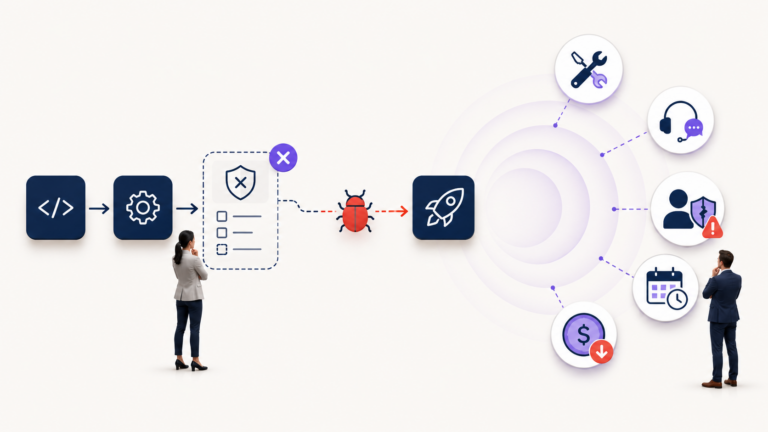
This is how deployment problems start. A change passes QA because the test case never specified the actual condition that breaks in production. The change ships, an incident ticket opens an hour later, and the gap often traces back to a test case that was too thin to catch the problem.
Good test cases fix this at the source. They remove guesswork, so different testers can run the same scenario and judge the result against the same criteria. Here is how to write them.
The Anatomy of a Good Test Case
Every test case needs the same core fields, in the same order, every time. Skipping important information is how gaps happen.
- Test Case ID: A unique code, like TC-045. Use it to track the case across test runs, bug reports, and audits.
- Title / Scenario: One line naming what you’re testing. Example: “Admin removes edit permission from a support agent role.”
- Description: One or two sentences explaining why the case exists and what requirement it checks.
- Pre-conditions: The exact state of the data, environment, and user account before you start. If the case needs a specific user role or a populated database, say so here.
- Steps to Execute: Numbered, specific actions. Each step should be one action, not three.
- Expected Results: What the system should do after each step, or after the final step. Be specific about messages, values, and screen states.
- Actual Results: What actually happened when you ran the test. This is filled in during execution, not before.
- Post-conditions: The state of the system after the test finishes. This matters when one test’s output feeds the next test’s setup.
- Status: Pass, Fail, or Blocked. Blocked means the case couldn’t be completed, usually because a pre-condition wasn’t met.
Missing information creates problems downstream. A missing pre-condition means the next tester can’t reliably reproduce your setup. A vague expected result means two people can look at the same output and reach different conclusions.
How to Write a Test Case From Scratch
Start with the requirement or user story, not the test case template. Read it twice. Find the verb: what is the system supposed to do?
Break that requirement into single, isolated actions. A user story that says “Agents can update their assigned tickets” hides several separate behaviors: changing status, changing priority, adding a comment, and reassigning the ticket. Each of those deserves its own test case.
Here’s a concrete example. Say the requirement is: “Admins can update a user’s role permissions in the ITSM portal, and the change takes effect immediately.” Break it down like this:
- Admin changes a user’s role from Agent to Manager. Confirm the new permissions appear right away, without a logout.
- Admin removes a specific permission, such as “Close Ticket,” from a role. Confirm the affected user loses that action immediately.
- Admin tries to change their own role. Confirm the system handles the action according to the defined security rule, such as blocking it or requiring approval.
- A user with an already-open session has their role changed mid-session. Confirm the session updates or forces a re-login, based on the requirement.
Notice that each case tests one behavior. That’s the goal. One case, one outcome, one clear pass or fail.
Positive, Negative, and Edge-Case Coverage
Most weak test suites focus heavily on the happy path: the user does everything right, and the system behaves as expected. That only covers part of the real risk.
Positive tests confirm the system works as designed under normal conditions. Using the permissions example, an admin grants a valid permission to a valid role, and the user receives it.
Negative tests confirm the system correctly rejects invalid input or blocked actions. What happens when an admin tries to assign a permission that doesn’t exist? What happens when someone without admin rights tries to open the permissions screen through a direct URL?
Edge cases sit at the boundary of normal behavior. What happens when an admin removes every permission from a role, leaving a user with zero access? What happens when two admins edit the same user’s permissions at the same time?
A strong test suite needs all three. Skip negative and edge cases, and you’re mainly checking that the software works when users, data, and systems behave exactly as expected. Production rarely stays that predictable.
Common Weak Spots and Other Traps to Avoid
Certain mistakes show up again and again in test suites. Watch for these.
Vague steps. “Check if it works” is not a useful step. It doesn’t say what to check, how to check it, or what “works” means. Instead, write the exact behavior you expect, such as: “Verify that the confirmation message reads ‘Permission updated successfully.'” If response time is part of the requirement, include that too.
Combining multiple scenarios into one case. If a case has three different expected results tied to three different conditions, split it into separate cases. A failure in one condition shouldn’t disappear behind a pass in another.
Ignoring negative testing. Teams under deadline pressure often go straight to the happy path. That is when missing validation, permissions, and error handling can slip through. A few focused negative tests can expose problems that a normal success-path test never touches.
Skipping pre-conditions. A test case that doesn’t specify starting data, user role, or environment forces every future tester to guess. Guessing produces inconsistent results, and inconsistent results create false confidence.
Ignoring boundary values. If a field accepts 1 to 100 characters, test 0, 1, 100, and 101. Boundary conditions are common places for validation defects to appear.
Skipping error states. Confirm that the system fails gracefully. A timeout, network drop, invalid request, or duplicate submission should produce a clear and useful response, not a blank screen or silent failure.
How Test Cases Support Change and Incident Management
Well-written test cases aren’t just a QA artifact. They can also become part of the evidence trail that IT service management relies on.
In Change Management, teams need confidence that a proposed change has been tested before it goes live. Where a Change Advisory Board or formal change approval process is used, documented test cases with clear pass/fail results can provide evidence that the change was validated. Without that evidence, approval depends much more heavily on assumptions and verbal confirmation.
Depending on the organisation’s change process, QA evidence may include the test case IDs that were executed, the pass, fail, or blocked status of each case, any failed edge cases, and how those failures were fixed, mitigated, or accepted as known risks. A raw spreadsheet can contain all the data and still make review difficult. A short, structured summary makes it easier for change reviewers to understand what was actually tested.
In Incident Management, a production bug usually needs to be reproduced before the team can investigate it properly. A test case with clear pre-conditions, steps, and expected results gives the incident team a ready-made starting point.
An incident team might find that “TC-045: Admin removes edit permission” is already failing in the latest test run. That doesn’t automatically reveal the root cause, but it gives the team a repeatable scenario and a much clearer place to begin the investigation.
This is also why the Actual Results field matters. When a case fails, the exact behavior that occurred can be carried into the defect or incident record. It shortens the distance between “something broke” and “this is exactly what happened.”
A Simple Template Teams Can Copy
Here’s a filled-out example using the permissions scenario, formatted so any team can copy the structure directly.
| Field | Example |
|---|---|
| Test Case ID | TC-045 |
| Title | Admin removes edit permission from Agent role |
| Description | Confirms permission changes apply immediately without requiring logout |
| Pre-conditions | Admin account with role-management access; test user assigned Agent role with edit permission enabled |
| Steps to Execute | 1. Log in as Admin. 2. Go to Roles > Agent. 3. Disable “Edit Ticket” permission. 4. Save changes. 5. Log in as the affected test user in a separate session. |
| Expected Results | Test user no longer sees the “Edit Ticket” action on assigned tickets, without needing to log out and back in |
| Actual Results | Filled in during test execution |
| Post-conditions | Agent role reflects the updated permission set for users assigned to it |
| Status | Pass / Fail / Blocked |
Copy this structure for every case. Consistency across the suite is what makes test cases easier to scan during an audit, regression run, or fast bug investigation.
If you’re using Jira, TestRail, or another test management tool, you can mirror the same core fields inside each case. Tag cases by feature area and priority, and link them back to the requirement or user story they cover. That link lets teams build regression sets around affected features instead of searching through the entire backlog every time something changes.
Keeping Your Test Suite Alive: Maintenance and Regression
A test suite rots if nobody maintains it. Cases written against an old workflow start producing false failures, and eventually testers learn to ignore them. That’s worse than having a smaller test suite you can actually trust.
Review test cases whenever the underlying requirement changes. If a feature’s behavior changes, update the linked test case as part of the same development cycle, not months later.
Tag cases by feature area and priority so you can build a focused regression set instead of automatically running the entire suite for every small release. For example, a permissions module change should start with permission-related test cases. If that module affects authentication, sessions, workflows, or other connected areas, expand the regression scope accordingly.
Retire test cases tied to removed features. A stale case that still sits in the suite wastes time and makes the real level of coverage harder to see.
Finally, keep ownership clear. Someone should be responsible for maintaining the test cases around each functional area, so test maintenance becomes part of normal development work rather than a cleanup project nobody has time for.