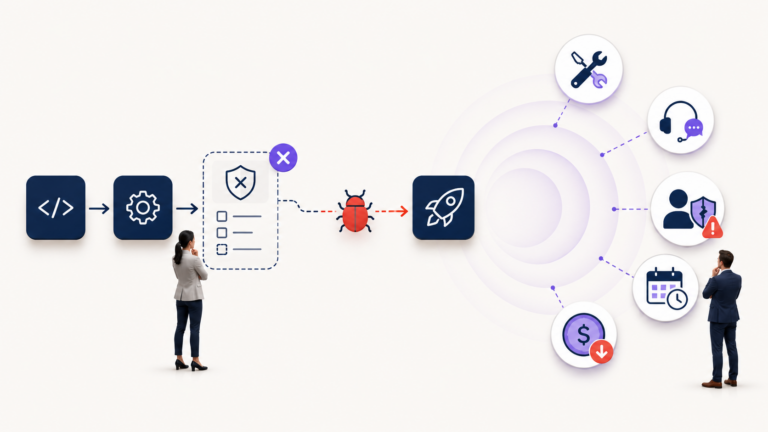


Manual testing has been questioned for years, especially with the rise of automation testing, AI-based testing tools, and faster software delivery cycles. Many teams now ask the same question whether manual testing is required anymore?
The simple answer is yes. Manual testing is still required, but its role has changed.
Manual testing is no longer about checking every small feature again and again by hand. Repetitive and predictable test cases can often be handled better through automation. But when software needs human judgment, real-world understanding, usability checks, business logic validation, and exploratory thinking, manual testing still plays a very important role.
For businesses working with ITSM platforms, enterprise applications, customer portals, workflow systems, and service management tools, manual testing is not outdated. In many cases, it is the difference between a system that technically works and a system that actually works for users.
What Is Manual Testing?
Manual testing is a software testing process where a tester checks an application manually without using automated scripts. The tester interacts with the software like a real user, reviews the features, follows test cases, explores different scenarios, and identifies bugs, usability issues, workflow gaps, and unexpected behaviour.
In manual testing, the tester does not only check whether a button works. They also check whether the user journey makes sense, whether the process feels clear, whether the business rule is working correctly, and whether the system behaves properly in real situations.
This makes manual testing valuable because software is not used by machines alone. It is used by people, teams, customers, agents, managers, and business users. Their experience cannot always be fully tested through automation.
Is Manual Testing Required Today?
Yes, manual testing is still required today. Even with strong automation testing tools, manual testing remains important because not every testing scenario can be automated effectively.
Automation testing is excellent for repetitive, predictable, and stable test cases. It can run large test suites quickly and help teams check whether existing features still work after new changes. But automation works best when the tester already knows what needs to be checked.
Manual testing is different. It helps teams discover what they may not have expected.
A manual tester can notice confusing navigation, unclear error messages, broken user flows, missing validation, incorrect business logic, poor layout, or a process that works technically but feels difficult for the end user.
That is why manual testing is required in modern software testing, especially during early feature testing, user acceptance testing, exploratory testing, usability testing, and business workflow validation.
Why Manual Testing Is Not Dead
Manual testing is not dead because software quality is not only about passing test scripts. Quality also means the software is useful, understandable, stable, and aligned with business needs.
An automated test can confirm that a login page accepts the correct username and password. But a manual tester can notice that the error message is confusing, the password reset flow is unclear, or the page behaves differently on a specific device.
An automated script can check whether a ticket was created in an ITSM platform. But a manual tester can verify whether the ticket moved through the right workflow, whether the approval step appeared for the correct role, whether SLA rules were triggered properly, and whether the service agent had the right information to act on it.
This is where manual testing still wins. It brings human thinking into the testing process.
Where Manual Testing Still Wins
Manual testing remains important in situations where the tester needs to think, observe, question, and understand how users will actually interact with the system.
1. Exploratory Testing
Exploratory testing is one of the strongest areas where manual testing is still required. In exploratory testing, testers do not only follow fixed test cases. They explore the application, try different paths, think like users, and look for unexpected issues.
This is useful when a feature is new, when requirements are still evolving, or when the system has complex workflows. A tester may find issues that were not written in the test plan because they are using judgment, curiosity, and experience.
Automation cannot easily replace this because automation follows predefined instructions. Exploratory testing helps uncover problems that no one planned for.
2. Usability Testing
Manual testing is important for usability testing because user experience needs human observation.
A system may work correctly from a technical point of view, but users may still struggle with it. The layout may be confusing. The button labels may not be clear. The process may take too many steps. The error message may not explain what went wrong.
These issues can affect adoption, productivity, and customer satisfaction.
Manual testers can evaluate whether the software feels simple, logical, and easy to use. This is especially important for ITSM systems, customer service portals, ticketing platforms, internal tools, and business applications where different users depend on the system every day.
3. User Acceptance Testing
User Acceptance Testing, also known as UAT, is another area where manual testing is required. UAT checks whether the software meets business expectations and is ready for real users.
This is not only about finding bugs. It is about confirming whether the software supports the actual business process.
For example, in an ITSM workflow, a business user may need to confirm whether an incident moves from creation to assignment, approval, resolution, and closure in the right way. They may also need to check whether notifications, escalation rules, role-based access, and reporting fields are working as expected.
These checks often need human understanding of the business process. That is why manual testing remains important in UAT.
4. Complex Business Workflows
Manual testing is especially valuable when applications include complex business workflows.
Many enterprise systems are not simple websites with a few screens. They include approvals, permissions, integrations, service requests, customer data, financial rules, notifications, dashboards, and role-based actions.
In such systems, a small issue in one step can affect the entire workflow.
Manual testers can follow the complete journey from start to finish and check whether the system behaves correctly from a business point of view. This is important in ITSM testing, CRM testing, ERP testing, workflow testing, and service management testing.
5. New Feature Testing
When a new feature is still changing, manual testing is often better than automation in the early stage.
Automation works best when the feature is stable. If the design, logic, or flow is still changing, writing automated test scripts too early can lead to wasted effort because those scripts may need constant updates.
Manual testing helps teams quickly review new features, identify early issues, give feedback, and improve the product before automation is added.
Once the feature becomes stable, automation testing can be introduced for repeat checks and regression testing.
6. Visual and Layout Testing
Manual testing is useful when checking design, layout, spacing, alignment, responsiveness, and overall visual behaviour.
Automated tools can help detect some visual differences, but human judgment is still important. A tester can notice whether a screen looks broken, whether a form feels too crowded, whether content is hard to read, or whether the user interface feels inconsistent.
For customer-facing applications, portals, dashboards, and mobile-friendly platforms, this matters a lot.
7. Real-World Scenario Testing
Users do not always follow the perfect path. They make mistakes, skip steps, enter unusual data, use different devices, click things in unexpected ways, and behave differently from test scripts.
Manual testing helps teams test these real-world scenarios.
A manual tester can ask practical questions like:
- What happens if the user enters incomplete information?
- What happens if the approval is delayed?
- What happens if the user has limited permissions?
- What happens if the same request is submitted twice?
- What happens if the user changes information halfway through the process?
These questions help improve software quality because they reflect how people actually use systems.
Where Automation Testing Works Better
Manual testing is important, but that does not mean every test should be manual. Automation testing is better for repetitive, high-volume, and stable test cases.
Automation testing works well for regression testing, smoke testing, API testing, performance checks, data-driven testing, and repeated functional checks. It helps teams save time, reduce repetitive effort, and test faster across multiple releases.
For example, if a team needs to check the same login flow, search function, report generation, or form submission after every release, automation can be very useful.
The best approach is not manual testing vs automation testing. The better approach is manual testing and automation testing together.
Manual Testing vs Automation Testing: What Should Teams Choose?
Teams should not treat manual testing and automation testing as competitors. They solve different problems.
Manual testing is best when the test needs human thinking, exploration, user experience review, business understanding, and flexibility.
Automation testing is best when the test is repetitive, predictable, stable, and needs to run many times.
A smart QA strategy uses manual testing where human judgment matters and automation testing where speed and repeatability matter.
This balanced approach helps businesses improve software quality without wasting time on the wrong testing method.
Why Manual Testing Matters for ITSM and Enterprise Systems
For ITSM platforms and enterprise systems, manual testing is especially important because these systems support real business operations.
An ITSM system may include incident management, service requests, change approvals, problem management, asset management, SLA tracking, notifications, dashboards, and user roles. These workflows are not only technical. They are operational.
A test script may confirm that a field is saved correctly, but a manual tester can check whether the full workflow makes sense for the service desk, the manager, the customer, and the business user.
This is why businesses should not ignore manual testing when implementing or improving ITSM systems. Manual testing helps ensure that workflows are not only functional, but also practical, usable, and aligned with business needs.
For Sydney-based organisations working with ITSM, QA, and digital transformation, manual testing remains a key part of delivering reliable and user-ready systems.
The Future of Manual Testing
The future of manual testing is not about replacing automation. It is about becoming more strategic.
Manual testers are no longer expected to spend most of their time repeating the same checks. Their role is moving toward deeper analysis, exploratory testing, business process validation, usability review, risk identification, and quality improvement.
As AI and automation tools become more common, manual testers will still be needed to ask better questions, understand user behaviour, review real workflows, and judge whether the software is solving the right problem.
Manual testing will continue to matter because human judgment will continue to matter.
Final Answer: Is Manual Testing Required?
Yes, manual testing is required. It is not dead, and it is not going away.
Manual testing still wins when software needs human judgment, business understanding, exploratory thinking, usability review, and real-world validation. Automation testing is powerful, but it cannot replace every part of the QA process.
The best software testing strategy combines both. Use automation testing for speed, scale, and repetitive checks. Use manual testing for exploration, experience, business logic, and quality that needs human attention.
In the end, manual testing is not about testing slower. It is about testing smarter, where human understanding still makes the biggest difference.
Need Help With Manual Testing or ITSM Testing?
Nikqik Technologies helps businesses improve software quality through manual testing, automation testing, ITSM testing, and digital transformation support.
Whether you are testing a new application, improving an ITSM workflow, validating enterprise software, or planning a better QA process, our team can help you build a testing approach that fits your business needs.