

Most engineering teams don’t struggle because they’re short on testing tools. They struggle because somewhere early on, someone decided testing had to be either manual or automated and the team’s been living inside that choice ever since.
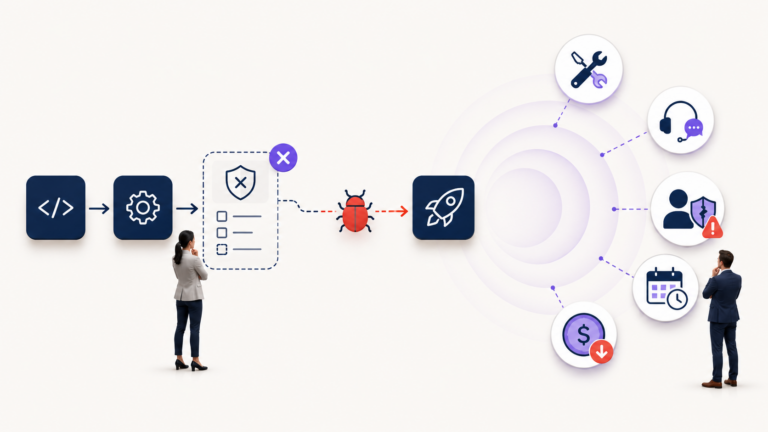
We’ve watched both extremes play out. One team starts automating every workflow before the product has even settled down. Scripts break every time the UI shifts. Engineers spend more hours patching automation than shipping features. And releases still need a human to sign off anyway, so the automation isn’t even saving the time it promised.
The other team leans almost entirely on manual testing. That works fine at first. Then the product grows, regression cycles stretch a little longer with every release, and QA quietly turns into the bottleneck nobody wants to name in the sprint retro.
Manual vs automation testing was never really a contest between two camps. It’s a question of where human judgement earns its keep, where repetition is just waste, and where a missed failure would genuinely hurt the business.
For a growing team, the answer is usually a blend, built around three things: how often you’re testing, how stable the feature is, and how much damage a failure would actually do. Get that balance right and QA becomes part of your delivery speed instead of something fighting it. Get it wrong, and testing becomes exactly the overhead everyone was trying to avoid in the first place.
What manual testing still does better
Automation is good at confirming what you already expect to happen. Manual testing earns its value when you’re still figuring out what could go wrong in the first place.
A script can confirm a button produces the response it’s supposed to. It can’t tell you the button is confusing, that a workflow feels needlessly fiddly, or that a user is going to pause for a second too long wondering what happens next. That gap shows up most clearly in four places.
Exploratory testing. This isn’t clicking through the product with no plan a good tester is actively hunting for where features interact badly, or where an assumption quietly breaks. They’re asking things like: what happens if these steps run out of order? Does the workflow survive incomplete or messy data? Does one feature start behaving differently once another setting is switched on? Automation follows instructions someone already wrote. Exploratory testing looks for the problem nobody thought to write down and in complex, integration-heavy products, that’s usually where the worst bugs are hiding.
UX and UI evaluation. A script can verify a page loaded and an element is visible. It can’t feel hesitation. It won’t notice that two buttons look equally important, that an error message is technically correct but useless, or that a five-step workflow should really be three. Users don’t usually report these as bugs they just quietly find the product annoying to use. Navigation clarity, visual hierarchy, form behaviour, accessibility gaps a human tester picks these up. Automation checks that the feature works. It takes a person to check whether it makes sense.
Early-stage and rapidly changing features. Automation gets expensive fast when the thing underneath it changes every few days flows, data structures, validation rules, permissions, all still in flux. Build heavy automation on top of that and you’re maintaining test scripts for a feature that hasn’t earned its keep yet. Manual testing is usually the smarter call here, right up until the workflow settles down and the expected behaviour stops moving.
Edge cases shaped by human behaviour. Real users double-click buttons, abandon forms halfway, switch devices mid-session, refresh during a transaction, paste in formats nobody planned for. A tester can spot this happening and chase it immediately. Automation can cover an edge case once someone’s found it it just can’t go looking for one on its own.
Manual testing is strongest wherever uncertainty is high and judgement matters more than repetition.
What automation actually replaces
Automation shouldn’t get added just because the team happens to have a tool for it. It should replace testing work that’s repetitive, predictable, and expensive to keep doing by hand which usually means the workflow is tested often, the expected result is clear, and the feature is stable enough that the test won’t need rebuilding next sprint.
Regression testing. As a product grows, features that already worked can quietly break because of changes somewhere else. Running the same regression checklist by hand before every release gets expensive fast testers repeat the same steps, developers wait on confirmation, and the release calendar starts depending on which tester happens to be available that week. Automated regression suites catch this earlier, on every code change, without needing a human to babysit the obvious stuff. That doesn’t remove the need for exploratory testing. It removes the need for a person to keep re-confirming behaviour that’s already well understood.
Smoke testing. Is the build even stable enough to test properly? Can users sign in, does the app load, are the core services responding, can someone complete the main workflow? These are deterministic, repeated constantly, and a good fit for automation when a smoke test runs right after deployment, a genuinely broken build gets flagged before anyone spends an afternoon manually confirming what a script could’ve told them in ninety seconds.
Load and performance testing. Performance problems rarely show up when one tester is poking around under ideal conditions. You need to know what happens under concurrent load, growing data volumes, slower APIs, infrastructure near capacity conditions a human can’t reliably recreate by hand, but a script can run the same way every time and let you compare builds honestly.
Repetitive, deterministic checks. Login flows, role-based access, standard form submissions, calculation checks, API responses, import/export if the steps are the same after every release and the expected outcome barely changes, manual execution is mostly wasted effort. This is where automation frees up your best testers to do the investigative work only they can do.
Fewer developer interruptions. This is maybe the most underrated benefit. When a broken build, a failed contract, or a regression gets flagged automatically before a developer has mentally moved on to the next ticket, you’re not just saving test-execution time. You’re protecting the whole team’s focus.
Automation is strongest wherever repetition is high, the outcome is predictable, and fast feedback protects the team’s ability to keep moving.
The decision matrix: when to choose manual vs automated testing
Put frequency, stability, and risk together, and the decision gets a lot less abstract.
| Frequency | Stability | Risk or impact | Recommended approach | Reasoning |
| High | High | High | Automate first | Frequent, predictable, business-critical this is where automation pays for itself fastest. |
| High | High | Low | Automate selectively | Worth automating for the time saved, but don’t over-invest in low-impact scenarios. |
| High | Low | High | Hybrid | Test manually while the feature’s still moving, automate the critical paths once they stabilise. |
| High | Low | Low | Manual initially | Constant change means the automation maintenance bill can outgrow its benefit fast. |
| Low | High | High | Hybrid | Automate the core checks where failure is serious, keep targeted manual coverage around the edges. |
| Low | High | Low | Manual or light automation | Not run often enough to justify heavy automation investment. |
| Low | Low | High | Manual, specialist testing | Still unstable, still high-risk this needs human judgement, not a script. |
| Low | Low | Low | Manual, as needed | Automating this rarely pays off. |
That said, this table is a starting point for a conversation, not a rule you enforce against real-world constraints. In practice, teams sometimes automate the payment flow because leadership wants it de-risked before a board meeting, not because the frequency-stability-risk math perfectly lines up. That’s a legitimate call to make just make it knowingly, not by accident.
Before automating anything, it’s worth asking: how often will this actually run? How often does the underlying feature change? What happens to customers if it breaks? How much judgement does the test genuinely require? What will it cost to maintain six months from now? Those five questions tend to produce a better answer than “should we automate more.”
Common mistakes teams make with manual vs automation testing
Automating unstable interfaces too early. When selectors, layouts, and workflows are still changing weekly, UI automation turns fragile fast every sprint becomes a scramble to fix scripts that were built around last week’s design. Start with the business logic that’s actually settled, not the whole interface.
Measuring success by how many tests exist. A big suite isn’t the same as strong coverage. Hundreds of low-value tests slow the pipeline down, generate noisy failures, and create a false sense of safety. A smaller suite that actually protects the critical user journeys usually beats a bloated one that doesn’t. Judge tests by what they catch, not how many of them there are.
Treating manual testing as the unskilled work. Reducing manual QA to “run the checklist” wastes the one thing experienced testers are actually good at: investigation, system thinking, and understanding how real people misuse software. Automation should take the repetitive execution off their plate so they can spend their time where judgement actually matters.
Ignoring what maintenance actually costs. Every automated test becomes part of your codebase it needs reviewing, updating, occasionally deleting. Teams that don’t budget for this end up with a suite that’s technically “passing” while quietly training everyone to ignore its failures.
How Nikqik approaches the balance
Growing teams rarely need another generic testing framework bolted on top of what they already have. What they usually need is clarity on where the current process is creating delay, duplicated effort, or risk nobody’s tracking.
Before recommending tools or automation coverage, we look at the release and regression process as it actually runs today, where defects are leaking into production, how fast CI/CD feedback is getting back to developers, who actually owns test maintenance, and which customer-facing workflows carry the most risk if something breaks.
From there, we build a QA approach around the product as it exists not a template. That might mean keeping exploratory testing on features that are still moving, automating the regression scenarios that run every release, tightening up deployment smoke tests, or simply making it clear who owns a test suite once the person who built it moves on. The goal isn’t automation for its own sake. It’s shorter feedback loops and releases that don’t depend on which tester happens to be free that week.
Balance is the actual advantage
Manual testing and automation solve two different problems. One brings judgement and curiosity. The other brings consistency and speed. A mature QA strategy knows which one a given situation actually calls for and isn’t afraid to mix them inside the same release.
The expensive mistakes run in both directions: relying on people to repeat work a script could do reliably, or writing scripts for problems that still need a human to think them through. Get the mix right and testing stops being a tax on delivery and starts being part of how fast you can safely ship.
If you’re not sure which extreme your team is closer to, that’s usually the first thing worth checking before deciding what to automate next. A short QA audit with Nikqik can tell you in a week, not a quarter, where automation is genuinely paying off and where it’s quietly costing more than manual testing would